 Image Generator
How to Write AI Image Prompts With Examples
Learn how to describe the subject, framing, and lighting in a text-to-image prompt. Try examples for product photos, landscapes, and illustrations.
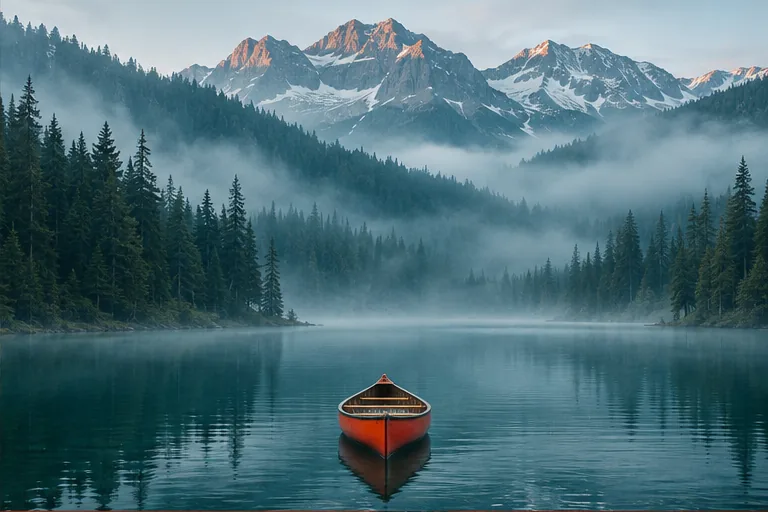
Write the prompt as if you were handing a short shot list to someone who has never seen the picture you have in mind. Name the main subject first, then tell them where the subject is, what the frame includes, and where the light comes from. Use the size control for square, portrait, or landscape.
Specify the decisions that are easy to see
“Beautiful perfume photo” leaves the bottle, background, camera angle, and light open. If the bottle should feel grounded and the label area needs space, say where it sits and what surrounds it.
Square product photograph of an unbranded forest-green perfume bottle on a light travertine block. Eye-level view. Soft window light from the left, a plain cream wall behind it, and room above the bottle.
The subject, surface and lighting are concrete details. If one detail matters most, put it early and keep later instructions consistent with it.
Match the prompt to the image you need
Landscape. “Wide view of an orange canoe on a still alpine lake at sunrise. Low silver fog over the water, dark evergreen trees along the far shore, and a soft reflection below the canoe.” Choose Landscape so the shoreline has room across the frame.
Illustration. “A small red fox walks through a moonlit garden of tall apricot flowers. Storybook gouache with visible brush strokes and soft paper grain. Full body in frame, with a clear path in the foreground.” If you intend to crop it for a card, leave extra space around the ears and tail.
Try a sample from the AI Image Generator, then change a detail you can judge from the result: the camera angle, time of day, palette, or expression.
Change one instruction after you see the result
If a portrait cuts off someone’s hair, ask for a wider head-and-shoulders framing with some space above the head. If the colors are right but the subject blends into the background, ask for more separation in the lighting. Reuse the rest of the prompt so you can tell which change helped.
When you already have the photo you want to work from, use the AI photo editing guide to write instructions for the parts that should change and the parts you want to keep.